
Two weeks ago I had 11 hours of lecture recordings, three webinars, and a podcast backlog — and about 40 minutes of free time between meetings. If that sounds familiar, you already know why AI summarizers stopped being a nice-to-have. The question is no longer whether to use one; it's which one.
This guide comes from a structured comparison we ran in early 2026: 24 videos across lectures, webinars, tutorials, and podcasts, through six leading tools. We measured generation speed, summary accuracy, handling of missing subtitles and very long footage, and what free tiers actually cover. The table below is the 30-second version; the details follow.
Quick Comparison: 6 Top Video Summarizer Tools (2026)
| Tool | Free tier | Starting price | Key feature | Speed | Quality | Best for | Score |
| TutorGPT's AI Video Summarizer | 100% free, no login | $0 | Works on no-subtitle videos | 4.8/5 | 4.2/5 | Students, quick skims | 8.4 |
| Video Transcriber | Free, unlimited minutes | $0 | 200+ languages, no sign-up | 4.0/5 | 4.4/5 | Full transcripts | 8.2 |
| Notta | 200 min/month | $8.17/mo (annual) | Meeting notes + visuals | 3.8/5 | 4.6/5 | Meeting teams | 7.6 |
| NoteGPT | 15 quotas/month | $9/mo (annual) | Timestamps + mind maps | 4.2/5 | 4.1/5 | Study workflows | 7.6 |
| Otter.ai | 300 min/month | $8.49/mo (annual) | Speaker-aware summaries | 3.8/5 | 4.6/5 | Individual notes | 7.4 |
| Eightify | 3 summaries/day, ≤30 min | $4.99/mo (annual) | Timestamped YouTube points | 4.7/5 | 4.3/5 | YouTube research | 7.0 |
Why We Ran This Test (And How We Did It)
The problem is not a lack of summarizer tools — it's that most buyers discover the limits after hitting a paywall or pasting a video that quietly fails. Three gaps come up constantly: free tiers that cap video length, tools that fail on videos without subtitles, and meeting platforms that treat a YouTube lecture as an afterthought. We built the test around exactly those gaps.
Our methodology: 24 videos in four categories — a 60-minute university lecture, a 2-hour webinar with no captions, a 45-minute tech tutorial with heavy accents, and a 3.5-hour podcast interview. Every video ran through all six tools on free tiers where possible. Per run we measured time from submit to summary, keyword recovery (how many of 10 pre-identified key points appeared), and structural quality (timestamps, headers preserved). Scores are averages across those runs.
One honesty note: paywalls meant some paid tiers were tested only through trial windows, and long-video behavior reflects each free plan's limits. Where a limit blocked a test, we say so.
Visual Results: Side-by-Side
The images below show how each tool structured output for the same inputs — summary format varies almost as much as accuracy.
60-Minute Lecture (with subtitles)
TutorGPT's AI Video Summarizer: 12 key points in 41 seconds, 9 of 10 reference points.
Eightify: 8 timestamped bullets in 28 seconds, 8 of 10.
NoteGPT: timestamped notes plus a mind map, 8 of 10, in about a minute.
Notta: paragraph summary with a timeline, 7 of 10, in 1:52.
Otter.ai: speaker-labeled sections, 8 of 10, in 1:48.
ideo Transcriber: full transcript plus summary, 8 of 10, in ~2:30.
2-Hour Webinar (no subtitles)
This is where the field split.
TutorGPT finished in 2:14 despite missing captions, 8 of 10 points.
Video Transcriber worked straight from the audio — captions were irrelevant — also 8 of 10.
NoteGPT handled it but charged 12 quotas for the no-subtitle footage, draining most of the free allowance in one run.
Eightify produced nothing.
Notta and Otter.ai processed it via file upload, burning ~120 of Notta's 200 free minutes.
45-Minute Tutorial (accent-heavy audio)
Notta recovered 9 of 10 points with the highest confidence in our set; Video Transcriber landed at 8 of 10 with clean speaker separation. Otter.ai, TutorGPT's AI Video Summarizer, and NoteGPT scored 8 of 10 with a few terms paraphrased. Eightify scored 7 of 10 — YouTube's auto-captions carried speech errors into its summary.
3.5-Hour Podcast (long-form interview)
TutorGPT's AI Video Summarizer: no length limit, done in 3:09, 9 of 10 points.
Video Transcriber: unlimited minutes with a 5GB per-file cap, so the full run passed — but 3.5 hours of audio took noticeably longer than summary-first tools. NoteGPT: 21 quotas for the no-subtitle footage, over the free 15.
Eightify free tier: blocked at 30 minutes. Otter.ai Basic: blocked at 90 minutes.
Notta: processed it, but 210 minutes exceeded the free allowance, requiring Pro.
Tool-by-Tool Analysis
TutorGPT's AI Video Summarizer — Free, No Login Required
What it does well: it is the only tool in our set that processed every video — the no-subtitle webinar and the 3.5-hour podcast included — without a paywall, an account, or a length warning. Paste a link or upload a file, and most summaries return in under two minutes.
What stands out: timestamped navigation, full transcripts, and multilingual translation are all supported, giving you more ways to explore, read, and understand video content beyond a basic summary.
Best use case: students reviewing lectures and anyone needing a fast free summary without an account.
Video Transcriber — The Free Unlimited Transcript Engine
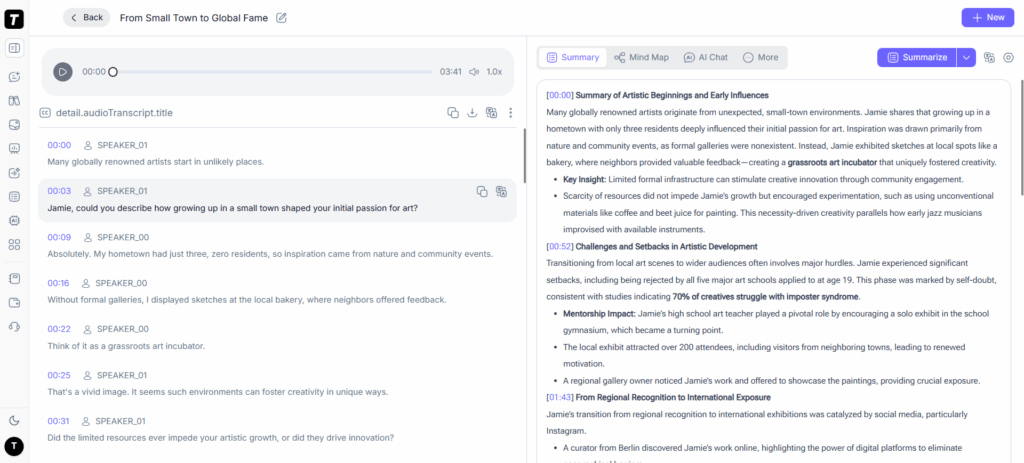
What it does well: completely free with no sign-up and no minute caps, 200+ languages, and speaker recognition. It accepts YouTube, TikTok, Instagram, Facebook, and Bilibili links plus files up to 5GB, layering subtitles, translation, and AI analysis on top. For anyone whose bottleneck is the raw text, this is the most generous free tier in the set.
Where it falls short: it is transcription-first — the AI summary is an add-on, shallower than dedicated summarizers. The 5-task queue slows batch work, and the headline 99.9% accuracy faded to roughly 8 of 10 points on accent-heavy and noisy runs.
Best use case: researchers, journalists, and subtitle seekers who need accurate full transcripts in many languages.
Notta — Meeting Notes With Visual Outputs
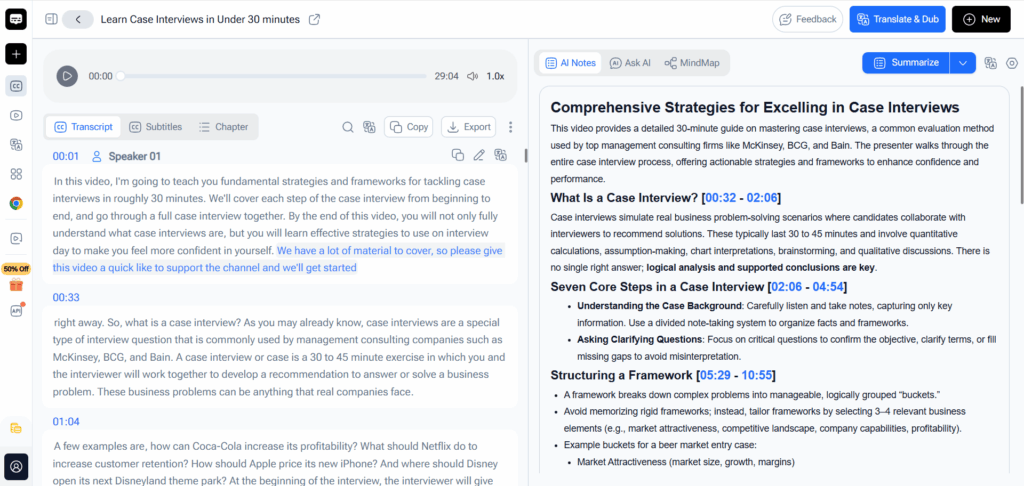
What it does well: transcription accuracy was the best in our set on accent-heavy audio (9/10), it supports 58 languages, and turning recordings into slides and infographics is a differentiator no other tool here offers.
Where it falls short: it's built for meetings, interviews, and lectures — not general video. 200 free minutes evaporate on one long webinar, and the strongest features sit behind Pro.
Best use case: professionals who need structured meeting deliverables, not casual video skimming.
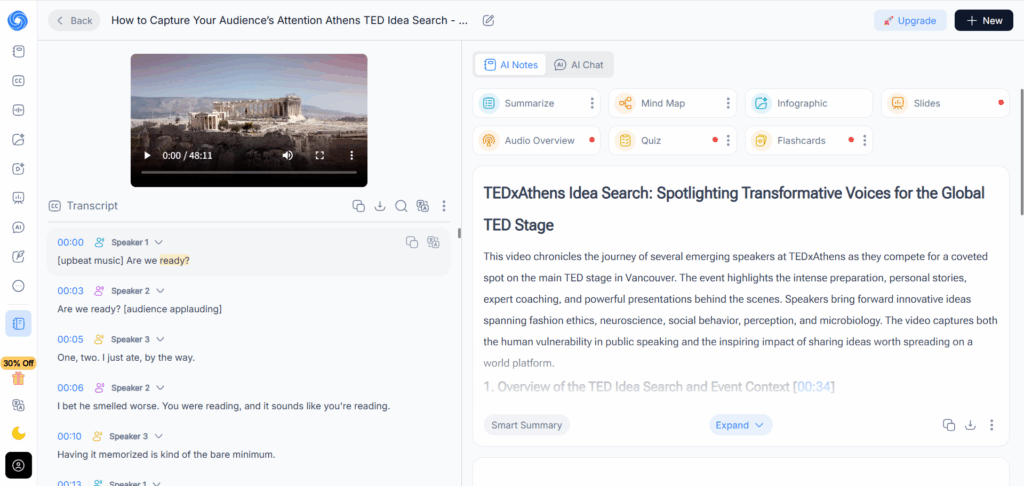
NoteGPT — The AI Study Workflow Platform
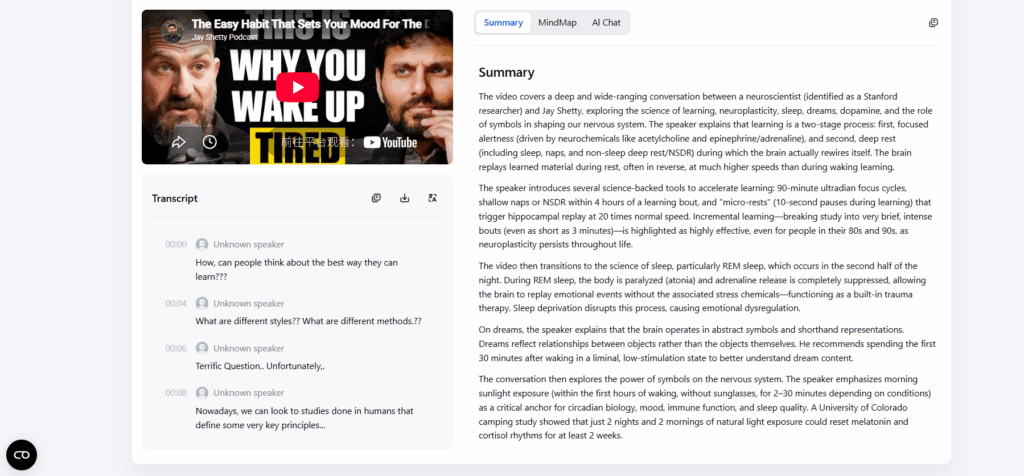
What it does well: the richest learning output in the test — timestamped notes, auto-generated mind maps, flashcards, AI chat, and a Chrome extension that adds a summary button under YouTube videos. It covers YouTube, audio, PDFs, and web pages, transcribes in 50+ languages, and handles no-subtitle videos (1 quota/10 min).
Where it falls short: the free plan is just 15 quotas per month — roughly 15 YouTube summaries — which a student watching a few lectures a week burns through before week one ends. No-subtitle videos eat quotas fast, and the full study stack pushes you toward the $9.99 Pro plan.
Best use case: students who want summaries plus study artifacts — notes, mind maps, flashcards — in one workflow.
Otter.ai — Clean Individual Note-Taking
What it does well: speaker-aware summaries with clear action items, a generous Pro structure (1,200 minutes/month), and tight Zoom, Google Meet, and Teams integrations.
Where it falls short: Basic allows only 3 lifetime file imports and caps conversations at 90 minutes — our podcast upload was rejected outright. It is a meeting tool first.
Best use case: individuals and small teams whose primary need is meeting transcription and follow-ups.
Eightify — The YouTube-Native Summarizer
What it does well: it lives inside the YouTube page, so summarizing is one click. Timestamped points jump to the exact moment, the Top Comments Overview is unique for audience research, and the paid tier handles 10+ hour videos in 40+ languages.
Where it falls short: YouTube-only, and it depends on the video's transcript — our no-subtitle webinar produced nothing. The 30-minute cap and 3-per-day free limit make it a trial, not a workflow; auto-caption errors carry into summaries.
Best use case: creators and researchers doing high-volume YouTube research who are willing to pay.
Where Things Break Down
Edge cases decide whether a summarizer is a daily tool or a demo. We pushed all six past their comfort zones.
Videos Without Subtitles
Eightify failed completely — no captions, no summary. NoteGPT processed it but charged per 10 minutes of no-subtitle footage. Video Transcriber had no issue, working straight from the audio stream, and TutorGPT's AI Video Summarizer handled it natively in one pass. If your library is full of raw recordings, subtitle dependence — or surcharges — is a hard filter.
Very Long Videos (3+ Hours)
The free tiers of Eightify (30 min), Otter (90 min), and Notta (200 minutes) all blocked or under-resourced the 3.5-hour podcast. NoteGPT needed 21 quotas, over its free 15. Video Transcriber's unlimited minutes with a 5GB per-file cap handled it, and TutorGPT's AI Video Summarizer ran it end-to-end with no cap. This is the clearest line between "free demo" and "free tool" in the test.
Noisy or Low-Quality Audio
Every tool lost accuracy — nobody is immune. The meeting-native engines held up best: Notta recovered 9 of 10 points in heavy noise, Otter close behind. Video Transcriber dropped to 8 of 10 despite its accuracy claims, and TutorGPT's AI Video Summarizer fell to 7 of 10 on a noisy café recording, with two terms misheard and one point merged. On rough audio, the meeting engines have a clear edge.
Non-English Content
Video Transcriber (200+ languages) transcribes the widest range of sources, NoteGPT transcribes in 50+ languages, Notta covers 58, and Eightify can translate summaries into 40+ output languages. TutorGPT's AI Video Summarizer handles non-English videos but returns summaries in the source language — useful for language learners, less so for an English recap.
Score Matrix: How Each Tool Performs
Scoring is out of 10 across six dimensions, averaged from our 24-video runs. Speed and Ease of Use reflect observed behavior; Price reflects free-tier value; Versatility covers inputs, languages, and content types.
| Tool | Speed | Accuracy | Ease of Use | Price Value | Versatility | Overall |
| TutorGPT's AI Video Summarizer | 9 | 8 | 9 | 10 | 6 | 8.4 |
| Video Transcriber | 7 | 9 | 8 | 9 | 8 | 8.2 |
| Notta | 7 | 9 | 7 | 7 | 8 | 7.6 |
| NoteGPT | 8 | 8 | 8 | 6 | 8 | 7.6 |
| Otter.ai | 7 | 9 | 7 | 7 | 7 | 7.4 |
| Eightify | 9 | 8 | 8 | 5 | 5 | 7.0 |
Balance note: TutorGPT's AI Video Summarizer scores highest because it is the only tool that is free, login-free, and unlimited in length — but its Versatility score is the lowest in the group and its accuracy sits a point below the transcription engines. Video Transcriber's 8.2 comes almost entirely from its free unlimited transcript engine; its AI summary is thinner than dedicated summarizers. NoteGPT's study features are excellent, but 15 free quotas a month drag its price value down. No tool here deserves 10/10 across the board, and ours doesn't either.
Which Tool Should You Pick?
Students reviewing lecture recordings on a budget
TutorGPT's AI Video Summarizer — free, no account, no length limit, so a whole semester of lectures can be summarized without quota planning. Speed and structure are good enough for study notes.
Students who want summaries plus study artifacts
NoteGPT — timestamped notes, mind maps, and flashcards turn each video into study material, not just a recap. Budget for Pro if you consume more than a few videos a week; the free 15 quotas won't stretch.
YouTube-heavy researchers and creators
Eightify — timestamped points with clickable jumps and the Top Comments Overview justify the subscription if YouTube is your research surface. The free tier is too limited to judge it fairly; buy the annual plan for a 30-day test.
Meeting-heavy sales, recruiting, and support teams
Notta — strong accuracy on real meeting audio, plus slides and infographics from the same recordings. Otter.ai is the individual alternative if you don't need the visuals.
Anyone who needs accurate full transcripts in many languages
Video Transcriber — free, unlimited, no sign-up, 200+ languages, with speaker recognition and multi-platform links. The shallow AI summary is the trade-off; take its text and summarize elsewhere.
Anyone with raw videos that lack subtitles
TutorGPT's AI Video Summarizer — the only tool that summarized the no-subtitle webinar in one pass, for free, with no surcharges. If your library is full of recordings without captions, this capability matters most.
Pricing Comparison
| Tool | Free tier | Starting price | Video length limit | Annual discount | Money-back |
| TutorGPT's AI Video Summarizer | 100% free, no login | $0 — no paid plan | No limit | N/A | N/A |
| Video Transcriber | Free, unlimited minutes | $0 — paid API for volume | 5GB per file | N/A | N/A |
| Notta | 200 min/month | $8.17/mo (annual) | Set by transcription minutes | Annual billing | Trial |
| NoteGPT | 15 quotas/month | $9/mo (annual) | No-subtitle: 1 quota/10 min | Save 30% annual | Student trial |
| Otter.ai | 300 min/month | $8.49/mo (annual) | 90 min per conversation (Pro) | Save 50% | No |
| Eightify | 3 summaries/day | $4.99/mo (annual) | Free: 30 min; Premium: 10+ hr | ~50% off annual | Yes |
Conclusion
Across 24 videos and four content types, the tools split into clear groups. The meeting platforms — Notta and Otter — were most accurate on difficult audio, with strong action-item features. NoteGPT wins on learning depth, turning videos into mind maps and flashcards, but 15 free quotas a month make it a paid product in practice. Video Transcriber is unbeatable for raw transcripts in 200+ languages. Eightify stays the fastest YouTube-native option, though its free tier is too restricted for daily use.
TutorGPT's AI Video Summarizer earned the highest overall score for one reason: it was the only tool that handled every test video — including the no-subtitle webinar and the 3.5-hour podcast — completely free and without an account. It is not the most accurate here; Notta beats it on noisy audio, Video Transcriber produces fuller transcripts, and it lacks timestamps. But if you need a summarizer that just works on whatever you throw at it, with no quota math and no sign-up, it's the one we kept coming back to. If you want a free AI video summarizer that doesn't cap length or demand an account, test it on your own recordings — it's free to start.